

Shooting field in Yarmill to record details from training or competition shooting — including intensity, miss count, timing, and miss positions.
Yarmill automatically parses shooting entries into structured data for analysis. Make sure to follow the format and syntax below to ensure your entries are recognized correctly.
Shooting Entry Syntax
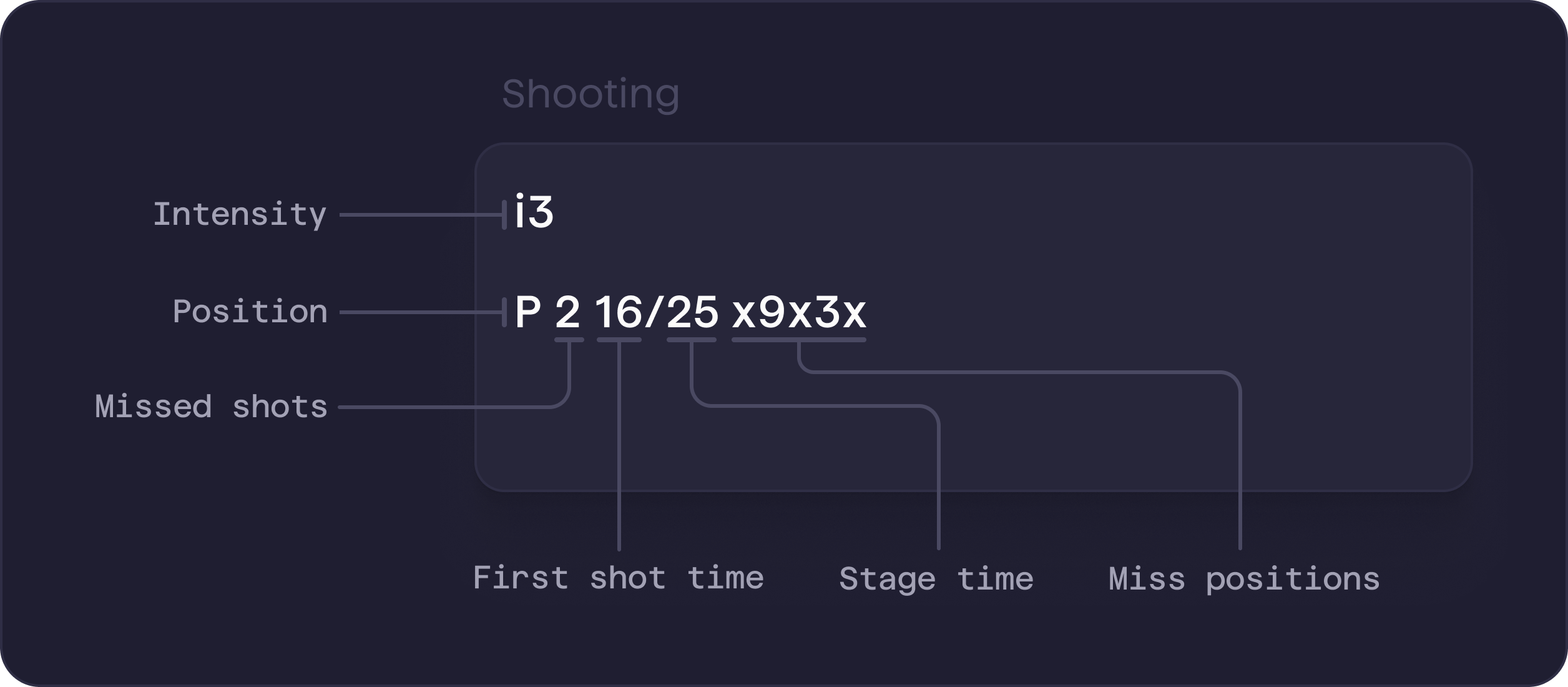
Parameters
Indicates the intensity level during which the shooting was performed.
Always comes first in the entry and applies to all following lines until a new intensity is defined.Accepted values:
i0orz0for static shooting- intensity name (usually
i1-i5) competitionorracefor race shooting
Defines the shooting position.
Must follow the intensity and applies to all following entries until a new position is specified.Accepted values:
Pfor proneSfor standing
Represents the number of missed shots in a stage.
You can enter multiple numbers in sequence (e.g.
0321) to log several stages at once using batch entry.Accepted values:- integer
0-5 X+Yfor relay shooting, whereXis the number of missed shots andYis the number of spare rounds used
3, 0+2First shot time & Stage time
Optional timing data for each shooting stage.
Represents the time of the first shot and the total time spent on the stage.Accepted values:
- times in seconds, separated by
/(first shot time / stage time) -for a missing or unknown value
14/29– first shot at 14s, total stage time 29s-/25– first shot time unknown, stage time 25s13/-– first shot at 13s, stage time unknown
Miss positions and order
Optional field that describes where missed shots went, using clock notation.
You can also log the full shot sequence by entering all five shots and using
x to mark hits.Accepted values:- clock numbers
1-12to indicate miss positions ',`, or,as separators between valuesxto indicate a hit when logging all five shots in order
3' 11' 12'– three misses at 3, 11 a 12 o’clock2 10– two misses at 2 and 10 o’clock4x5xx– miss at 4, hit, miss at 5, hit, hit (first and third shot missed)
Examples
Batch entry (no details) – v1
Batch entry (no details) – v2
Detailed entry with miss positions
Detailed entry with times & miss positions
Detailed entry with order of missed shots
Pro Tips
- Be concise – Use batch mode when you don’t need detailed info (like times or miss positions).
- Double–check your entries – Go to
Analytics / Shooting Analysisand check the table at the bottom to make sure your entries were parsed correctly.